Plan the show. The paperwork follows.
Answer a few questions about the show and get a laid-out, cabled plan with a pull sheet in about a minute – then make it yours. Or trace the venue's floor plan and draw it yourself. Either way, that one plan becomes your call sheet, run of show, safety paperwork and client quote, and it's checked as you go.
30 days free for early testers · No card needed · Then €19.99/month + tax for your whole team

From a blank page to a pull sheet in a minute.
No more building the whole rig at base to check it, or bringing twice the kit just in case. Plan it on screen, and the van carries exactly what the job needs.
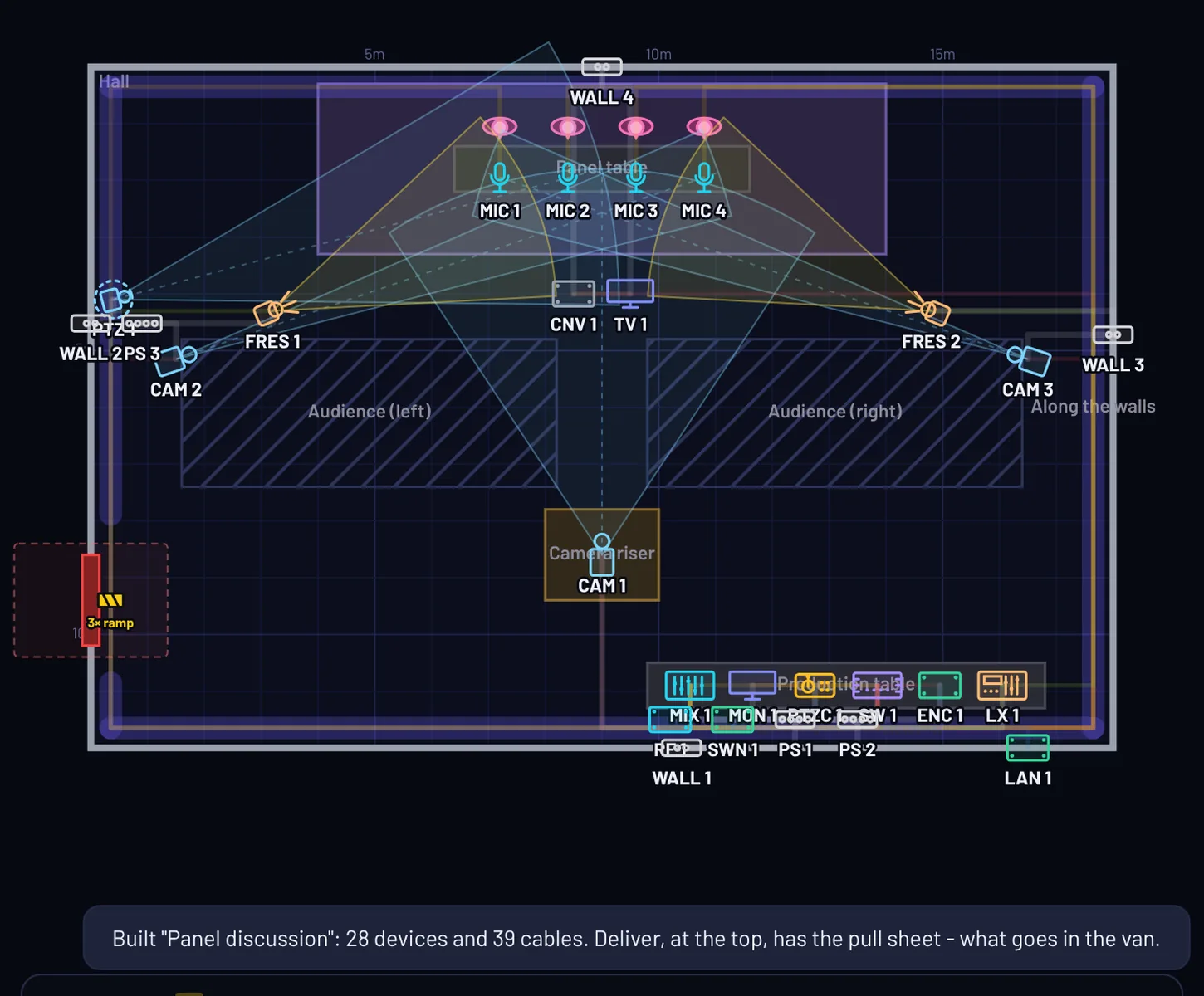
Answer a few questions, get a cabled plan
Pick the type of show – talk, panel, church service, awards or concert – the room size, cameras, screens, mics, PA, lighting and stream. Quick setup lays it all out, cables it and powers it, with the right switcher for the size of the job.
Every plan it builds passes its own checks: cable runs within limits, nothing across the audience or a fire exit. Then move things, swap kit and make it yours.
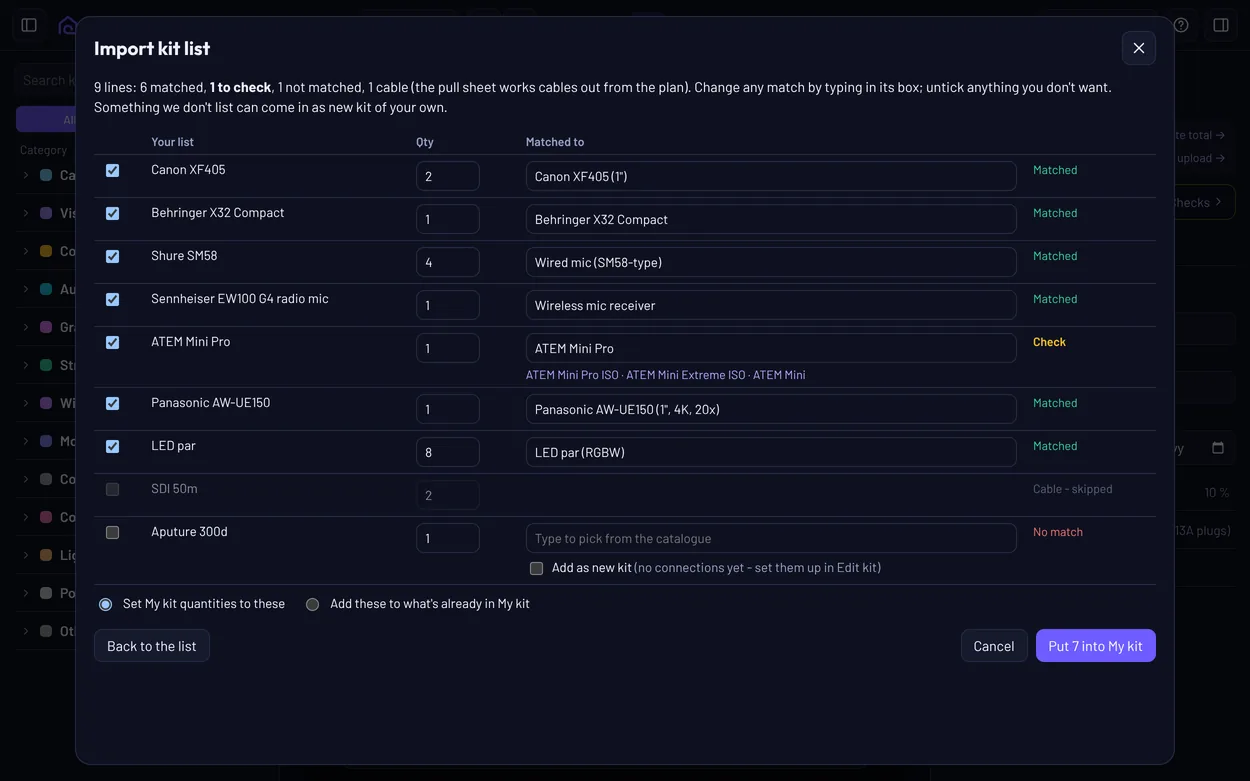
Your kit's already in. Bring your own list if you like.
You don't have to enter anything to start – the catalogue has 200 real products with their actual ports, and 600+ lights, ready to drag onto the plan. Want plans built from what you own? Paste your spreadsheet, an old pull sheet or your inventory. VenuCable matches it by model and trade name – X32, SQ-5, UE150, SM58, K12 – and you check every match before anything changes.
From then on, Quick setup plans with the kit you own first.
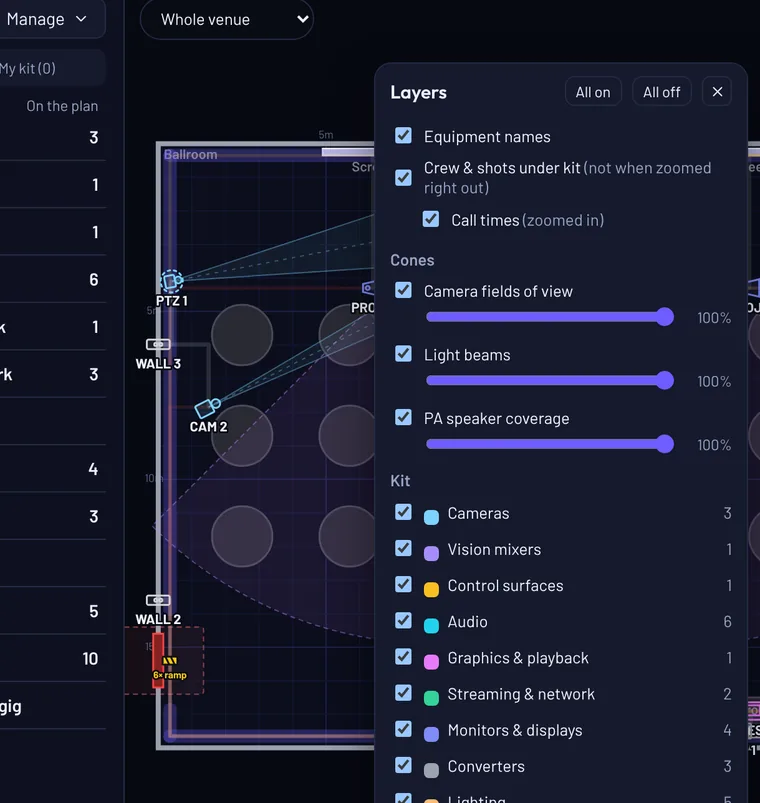
See the coverage
Camera shots, light beams and PA coverage show as cones on the plan, so you can see what's covered before you get there. Fade or hide any of them, and any kind of kit, to keep the plan readable.
Draw it once. Stop retyping it into six spreadsheets.
Every document comes from the same drawing, so when the plan changes, they all change with it.
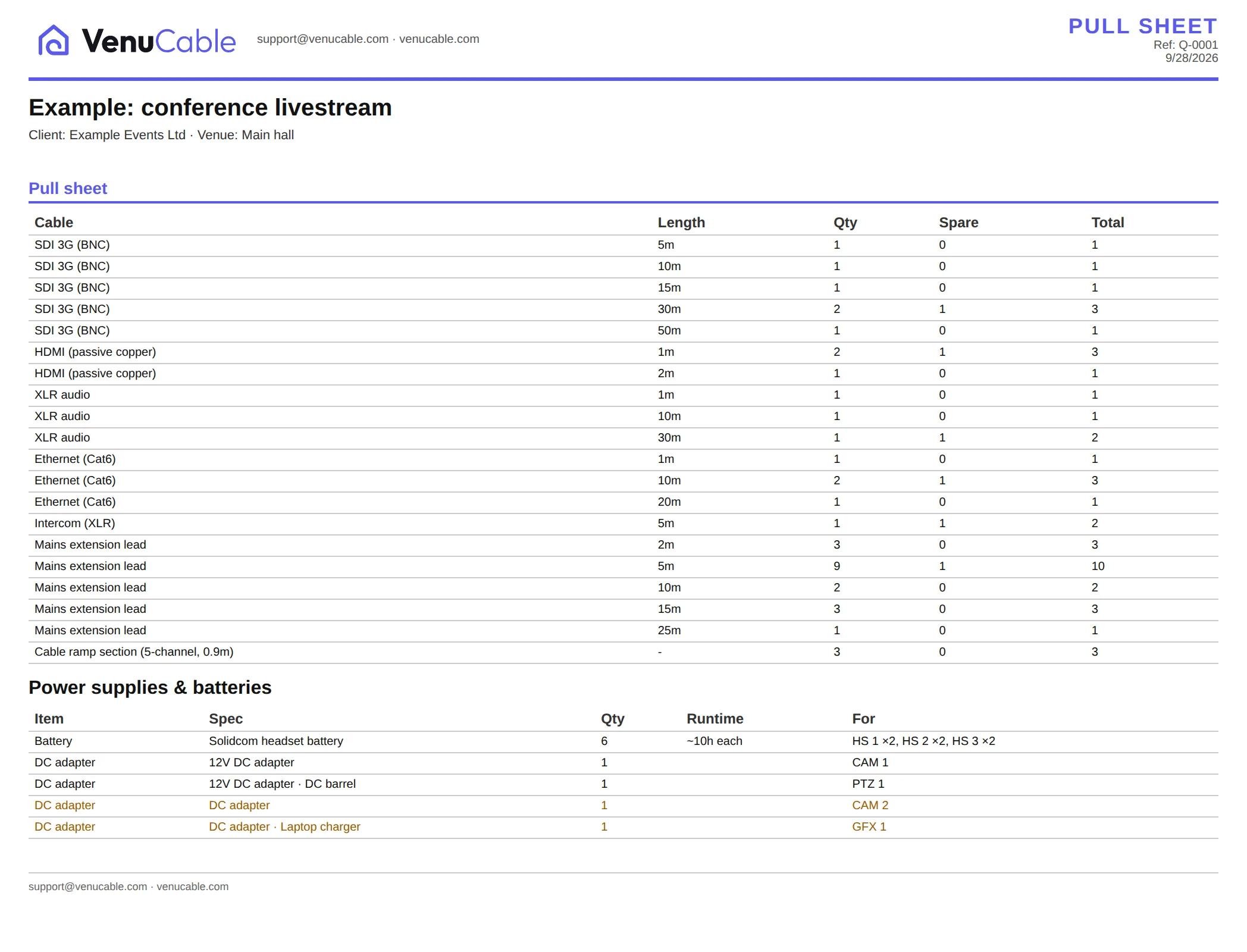
Cable pull sheet
Every run with its type, length and spares, rounded up to the lengths you actually stock.
Power and load
Load on every strip, circuit and generator, plus the adapters and batteries to pack for the day.
Network and stream
Upload needed against upload available, switch port traffic, PoE budgets and Wi-Fi links.
Call sheet
Crew calls worked back from show time, with venue access, contacts and emergency details.
Risk assessment & method statement
The RAMS, built from the plan: hazards and controls, then how the job is done safely, step by step. Marked draft until you sign them off.
Client quote
Your rate card, hire-in mark-up, logo and terms, as a clean PDF proposal for the client.
Paperwork your crew will actually read.
Print one report or the whole pack as a PDF, with your logo and colours on every page.
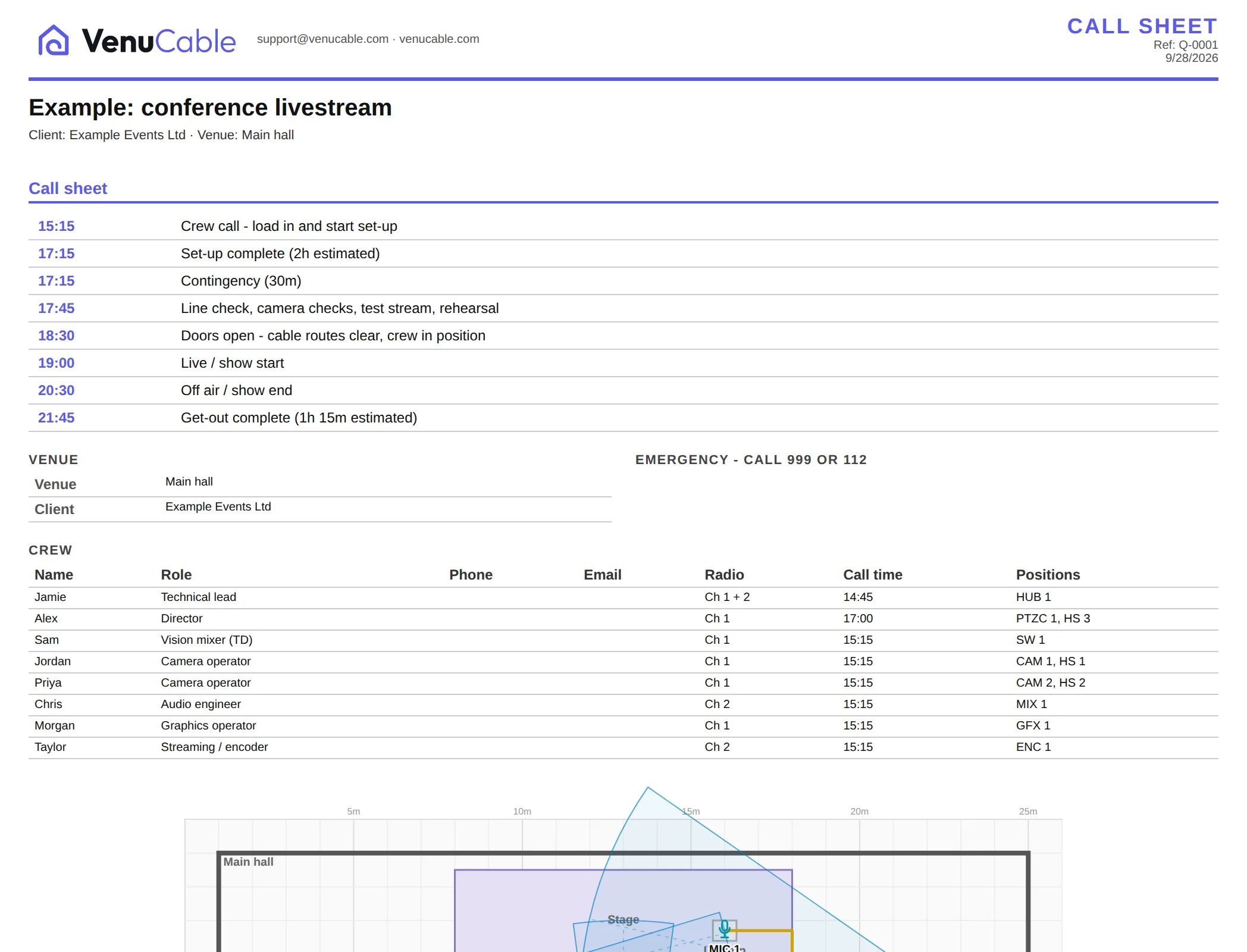

The paperwork venues ask for, written for you.
Drafted from the plan you've already drawn, so there's almost nothing to fill in. You check it, sign it off, and get back to the job.
- Risk assessment & method statementHazards and controls, then how the job is done safely, step by step from load-in to get-out – with a briefing record for the crew to sign.
- Site surveyAccess, power, internet and rigging on one page, with a list of what's still to confirm with the venue.
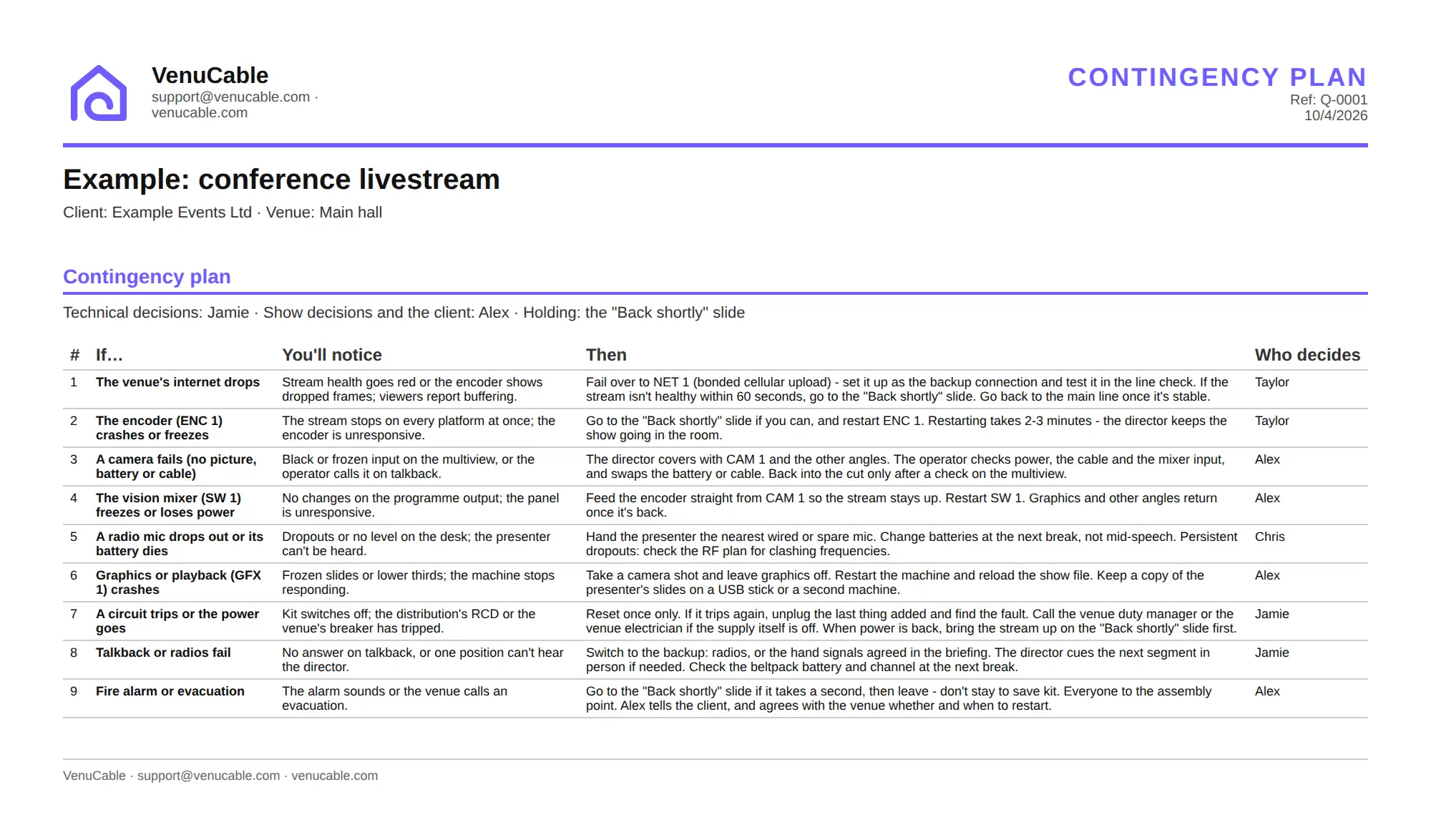
- Contingency planIf the internet drops, a camera dies or the alarm goes: what to do and who decides, written from your actual kit. Checks flag single points of failure.
- Handover checklistLeaving a PA and projector with the client? What's left, what they were shown, who to call – and both signatures.
- Electrical & rigging recordsTest sheets, an equipment test register and a rigging register, pre-filled for your competent person to complete on site. Record sheets, never certificates.
Wording follows your region – UK, Ireland, EU, US, Australia and New Zealand: PAT or test and tag, RCD or GFCI, the local emergency number, and the standard for temporary event power where there is one.
The run of show, the stream and the van, from the same plan.
The kit on your plan feeds the cues, the stream destinations and the check-off list, so nothing gets typed twice – and on the day, the same running order runs the show.
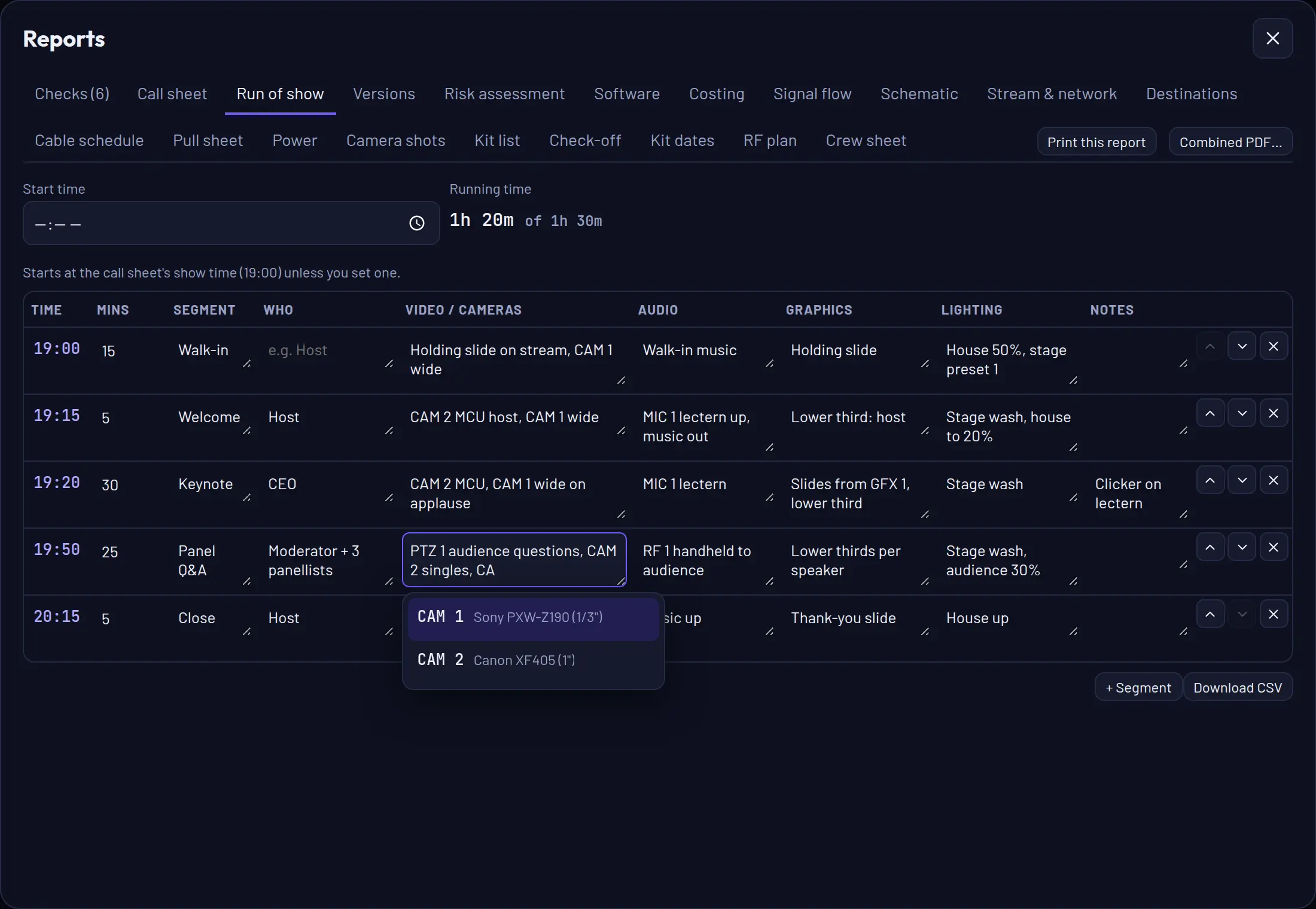
Run of show
Segments, timings and cues for video, audio, lighting and graphics. Start typing a cue and it suggests the kit on your plan. Write the running order first if you like – it flags anything you mention that isn't on the plan yet.
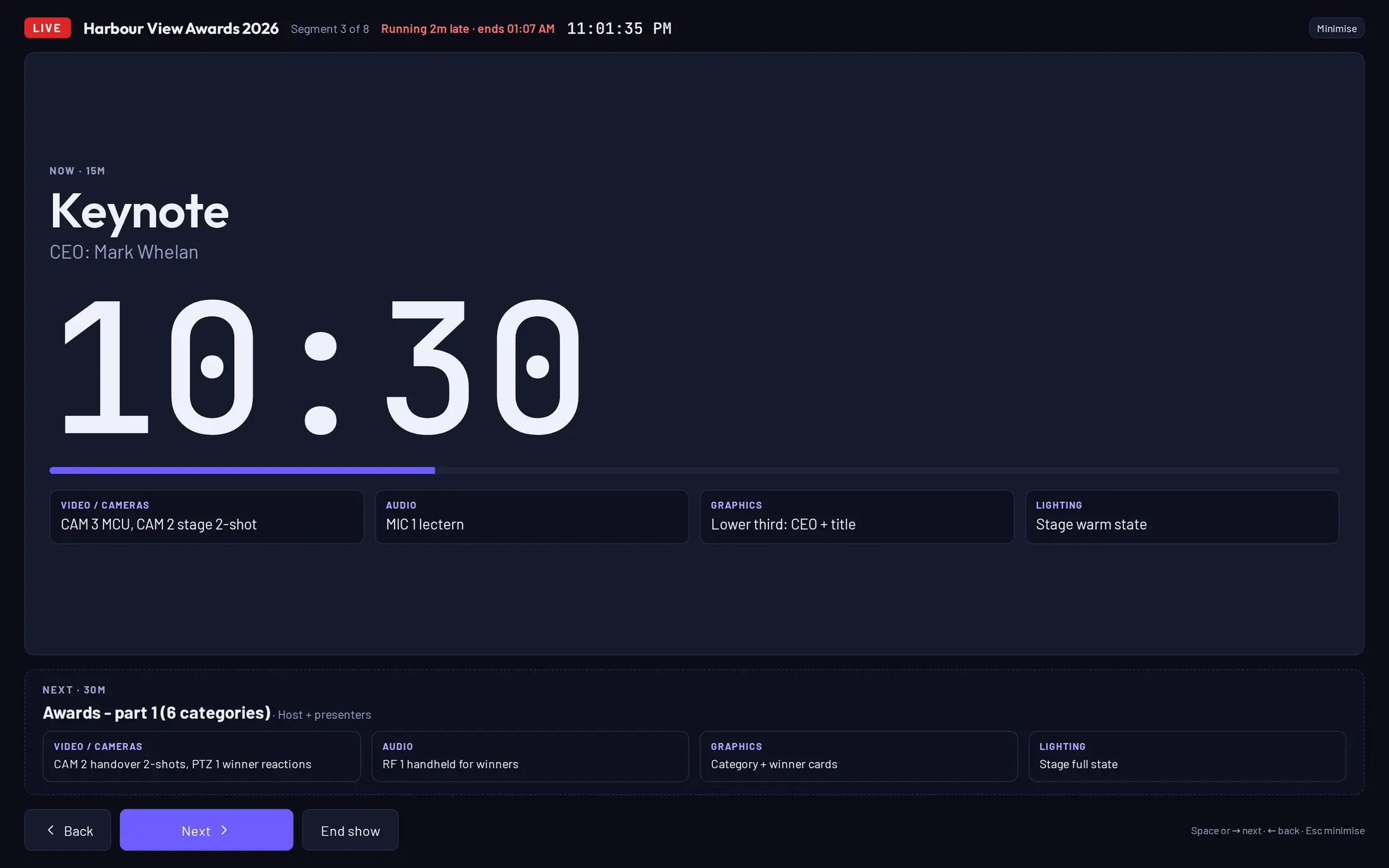
Go live on show day
One click turns the run of show into a live screen: the segment on now with a big countdown, who's on, every department's cues and what's next.
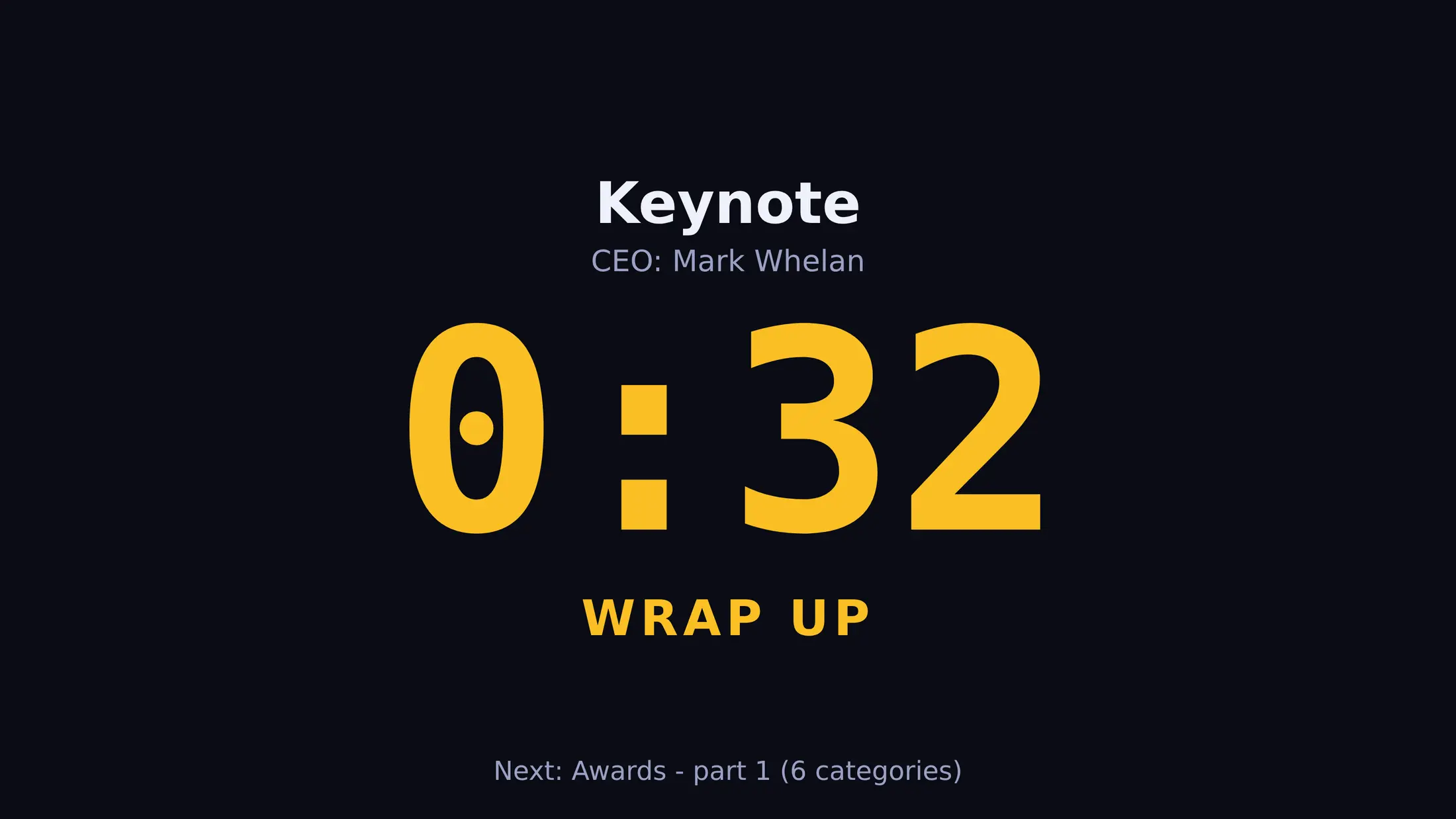
The countdown goes amber in the last minute and red when a segment overruns, and the top bar tells you if you're running late and when you'll finish. Space, a presenter clicker or a Stream Deck moves you on.
Stream Deck and an NDI show timer
Add the free VenuCable module to Bitfocus Companion and your Stream Deck runs the show – GO, Next and Back, plus keys for the countdown, time to the finish and whether you're running late. While you're planning, flick through the kit a category at a time and one press drops an item straight onto the plan.
Companion can run on your laptop, a server or a Pi – pair it once with a key from VenuCable. VenuCable also gives you a clean show timer to bring into vMix or OBS and send out as NDI: a full operator view, or a big presenter countdown that says WRAP UP and TIME UP, ready for a confidence monitor or stage screen.
Everyone gets their own cues
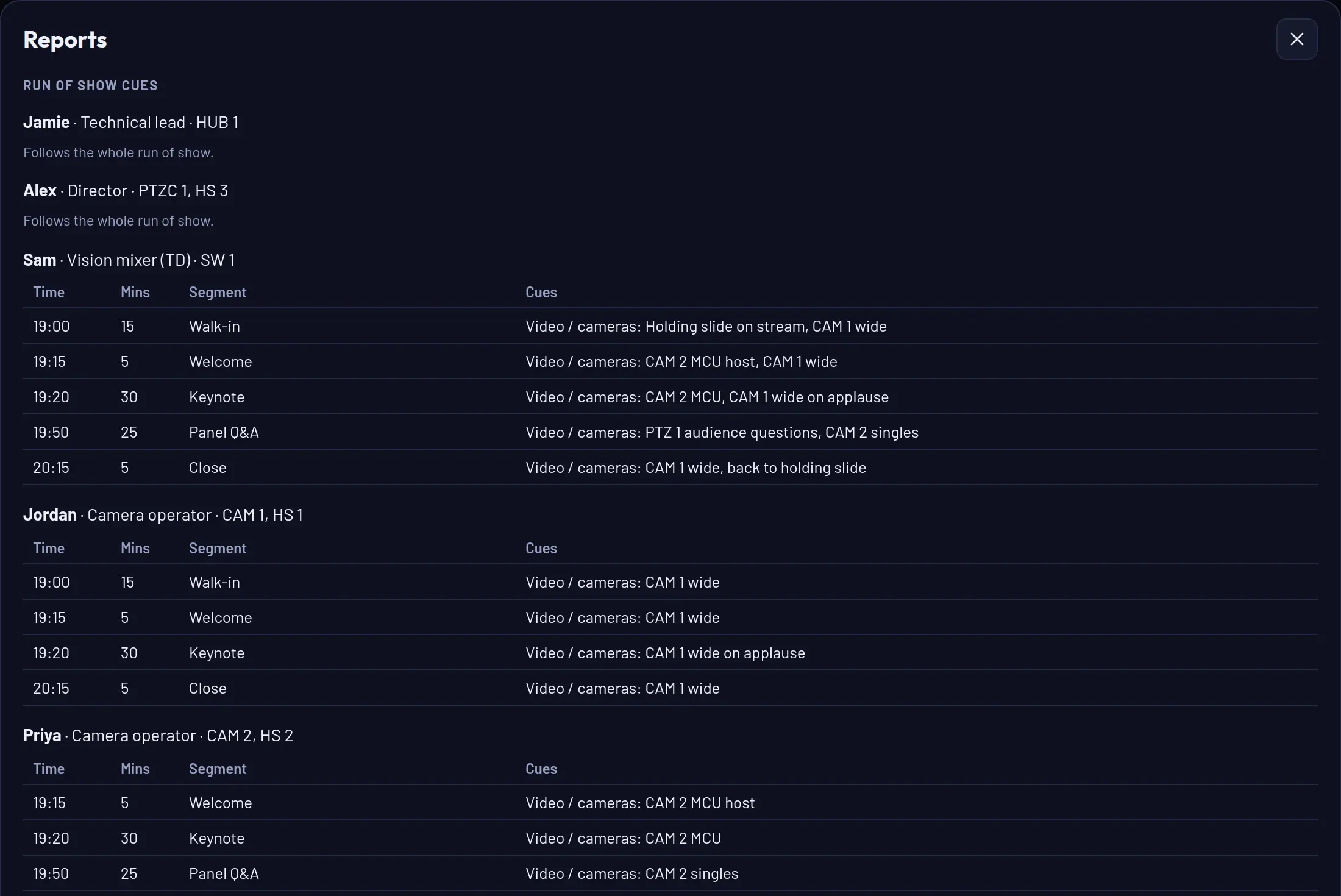
The crew sheet gives each person just their part of the run of show. Camera ops see their camera's cues, the vision mixer and stream operator see the video column, and the director gets the lot.
Stream destinations
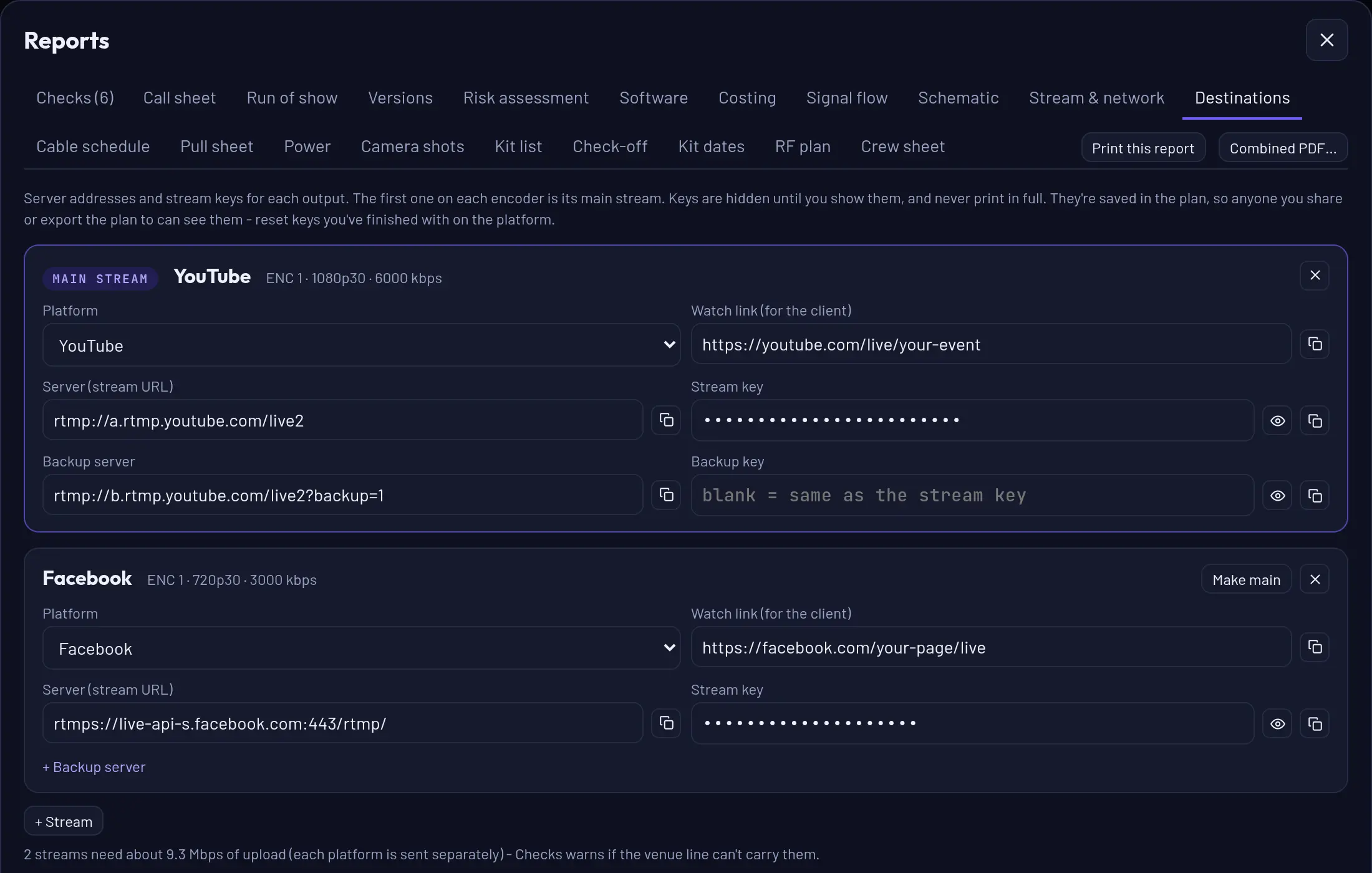
Server, stream key, backup and watch link for every platform – YouTube, Facebook, Twitch, LinkedIn, Vimeo or your own. Keys stay hidden until you need them and never print in full, and the checks warn if the venue's upload can't carry every stream.
Check it out, check it back
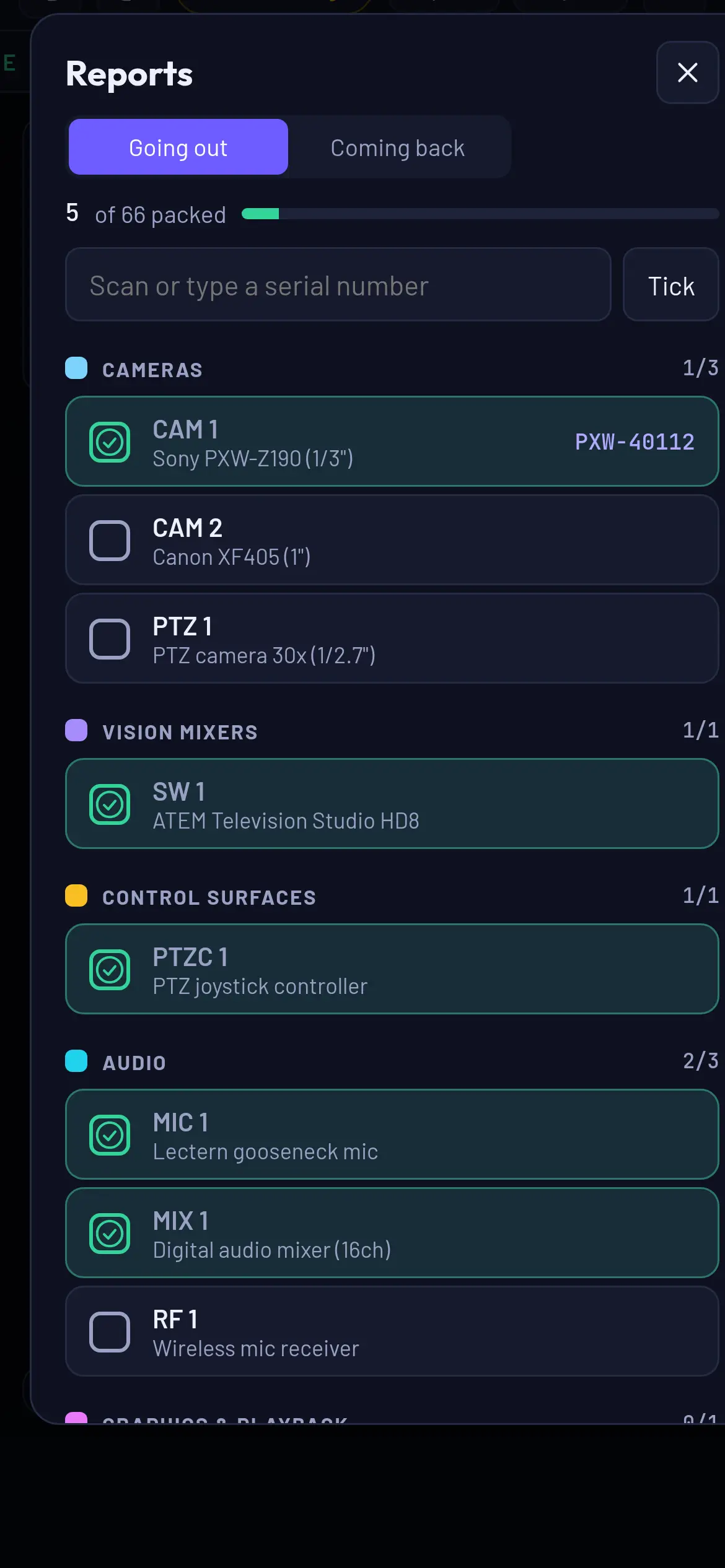
Tick off every item on your phone as it goes on the van and again when it comes back. Scan the barcode or type the serial, and you know exactly which unit went where.
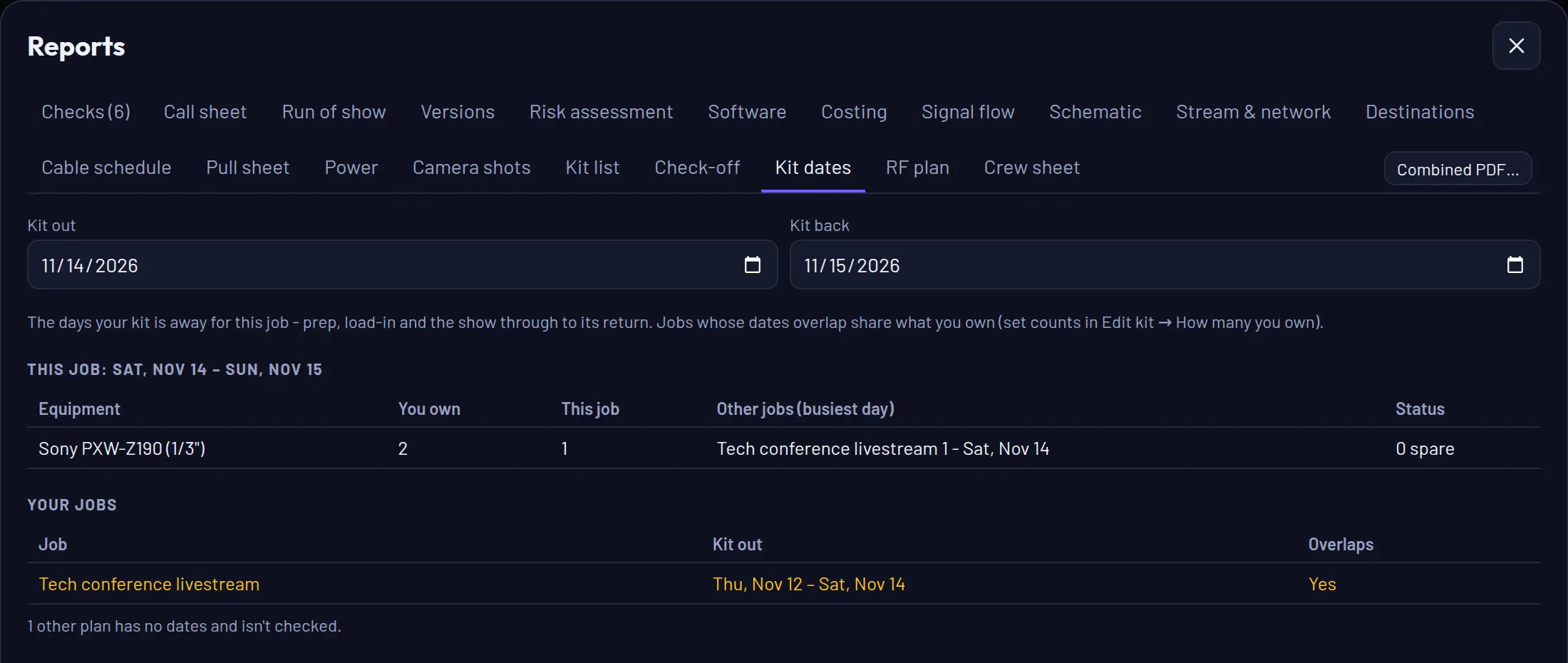
Kit clashes across jobs
Give each job its kit-out and return dates. When two jobs overlap and need more of something than you own, VenuCable tells you before you promise it to both.
The bits that usually live on a scrap of paper.
RF plan
Every radio mic and IEM frequency in one list, checked for doubled channels and intermod clashes.
IP addresses
Give every networked device an address, or fill them in automatically. Duplicates and out-of-subnet addresses are flagged.
Versions and sign-off
Issue revision A, B, C to the client and record who signed it off. You'll know when the plan has changed since.
Your own categories
Add equipment categories to suit how you work – rigging, set, comms – shared across your whole company.
Serials and test dates
Record the serial and last electrical safety test (PAT, test and tag) of every unit you own. Checks warns when one going out on a job is due.
Site photos
Take photos on the recce and pin them to the plan, so the crew can see the power point before they get there.
Trace any plan
A venue PDF comes in at real size from its drawing scale. A Google Earth screenshot or a photo of the fire plan? Measure one distance you know and everything scales to match.
Outdoor sites
Draw roads and footpaths, straight or curved. Every cable that crosses gets its vehicle ramps or matting worked out, and links are checked for line of sight.
Long runs, joined
Run longer than your longest cable? It's made from the lengths you own – 25 + 15m, not a custom cable – with the barrel or coupler to pack.
Find the problem on the plan, not at load-in.
As you draw, VenuCable checks cable lengths, loads, escape routes, batteries, bandwidth, radio frequencies, kit across jobs, test dates, backups and crew. It tells you what's wrong and what to do about it.
- ERRORHDMI 1 is a 24 m run. Passive HDMI is only reliable to 15 m – use SDI or a fibre HDMI cable.
- ERRORPWR-3 crosses the fire exit route unprotected. Reroute it, or ramp it and keep the door clear.
- WARNCircuit A is at 94%. Move the LED wall to another circuit.
- WARNCAM 2's battery lasts about 2.5 hours and the day runs 6. Bring 3 × NP-F970, including a spare.
- WARNKit clash on Sat 14 Nov: Sony PXW-Z190 – you own 2, this job uses 1 and "Tech conference livestream" 2. 1 short – hire in or move kit.
- WARNIntermod: 2 × 606.250 − 608.500 = 604.000 MHz lands on RF 3 (604.000).
- WARNElectrical safety test over a year old: SW 1 (ATEM-7731, tested June 2025). Retest before the job or swap the unit.
- INFOThe stream has one internet connection (the venue's). A bonded-cellular or Starlink backup keeps you live if it drops.
Built for the way crews actually work.
One plan for the whole team
Invite your crew by email. Everyone works from the same plans, and if two people change one at once, both versions are kept. Assign people to cameras and positions and their names show on the plan, with any position nobody's on flagged.
Works when the venue Wi-Fi doesn't
VenuCable and your company's plans are kept on your laptop too, so it opens and works on site with no signal – and saves as soon as you're back online.
Your kit, your rates
Start from 200 real products with their actual ports – ATEM, Roland, Panasonic and Sony PTZs, Behringer, Allen & Heath and Yamaha desks, Shure wireless, Decimator, Magewell and more. Paste in your own kit list, add anything we don't have, and set your rates and hire-in costs.
One price. Your whole company.
No per-seat charges. Try everything free first – 30 days for early testers.
Billed monthly. Switch to yearly and get two months free.
- Your whole team – no per-seat charge
- Unlimited plans and venues
- Every report, check and PDF
- Run of show, stream keys and kit check-off
- Risk assessment, method statement, site survey, contingency plan and handover
- Your branding, rates and kit catalogue
- Data stored in the EU
No card needed for the trial. Cancel any time. 14-day money-back guarantee on your first payment.
Just one job, or a few big shows a year? Buy a gig pass: €29 + tax, once, for 30 days of everything – no subscription, nothing to cancel. When it ends your plans stay saved for next time; buy another pass for your next show and pick up where you left off.
Questions
Do I have to draw everything from scratch?
No. Use Quick setup or a ready-made plan to get a cabled plan in a minute, trace the venue's own floor plan, or paste in your kit list so plans use what you own. Then change whatever you like.
Do I have to enter all my equipment first?
No. The kit is already in – 200 real products with their actual ports, and 600+ lights – so you can drag it straight onto the plan, or let Quick setup do it for you. Importing your own kit list is optional: it just means plans use what you own first.
What happens when the trial ends?
Your account becomes view-only until you subscribe. Nothing is deleted – you can still open every plan and export it as a plan file. Editing, printing and PDFs come back as soon as you subscribe.
Does it replace my risk assessment and method statement?
No. It drafts both from your plan, and a competent person on your team reviews them and signs them off. They stay marked draft until they do.
Does it work outside the UK and Ireland?
Yes. Pick your region – UK, Ireland, EU, US, or Australia and New Zealand – and voltages, plug and circuit ratings, emergency numbers and the safety paperwork's wording follow it. Lengths work in metres or feet, and client quotes use your own currency.
Will it give me electrical or rigging certificates?
No – only a competent person on site can test and certify. VenuCable pre-fills the record sheets from your plan, so they just add the results and sign.
Can my freelancers use it?
Yes. Invite anyone by email and they join your company account. Remove them when the job's done.
Does it work without internet?
Yes. Open it once with internet on each laptop you'll use on site and it keeps a copy of itself and your plans. After that it opens with no signal – or on venue Wi-Fi that's connected but going nowhere – and your changes sync when you're back online.
Where is my data kept?
In the EU (Ireland). There are no tracking or advertising cookies. See the privacy policy.